
쿠키 정책
언어를 선택하세요

문서 제목: GeckoWiper 사용자 설명서
수정 버전: revR
수정일: 2026년 9월 26일
작성자 (회사명): Tigs Design & Engineering GmbH
문서 상태: 공개됨
1. 서론
GeckoWiper 를 구매해 주셔서 감사합니다! https://www.geckowiper.com 에서 구매 가능한 GeckoWiper는 진공 패드와 자석 시스템을 이용한 이중 장착 방식의 최첨단 탈부착형 후면 유리 와이퍼입니다. 특허 출원 중인 이 혁신적인 제품은 공구 없이 간편하게 장착할 수 있으며, 차량 후면 유리를 효율적이고 안정적으로 세척해 줍니다. 올바른 설치, 유지 관리 및 사용을 위해 본 사용 설명서를 꼼꼼히 읽어 주시기 바랍니다.
2. 호환성
후면 유리 와이퍼 시스템은 다음 용도에 대해 성공적으로 검증되었습니다.
주목:
-
아래 표 1에 나열되지 않은 차량 및 용도에는 사용을 금지합니다. 용도별 적합성 검증이 부족하여 안전을 보장할 수 없기 때문입니다.
-
다른 용도에 대해서는 https://www.geckowiper.com 에서 정기적으로 자격 요건을 확인하시거나, Geckowiper 문의하기를 통해 차량/용도에 대한 직접 문의를 보내주시기 바랍니다.
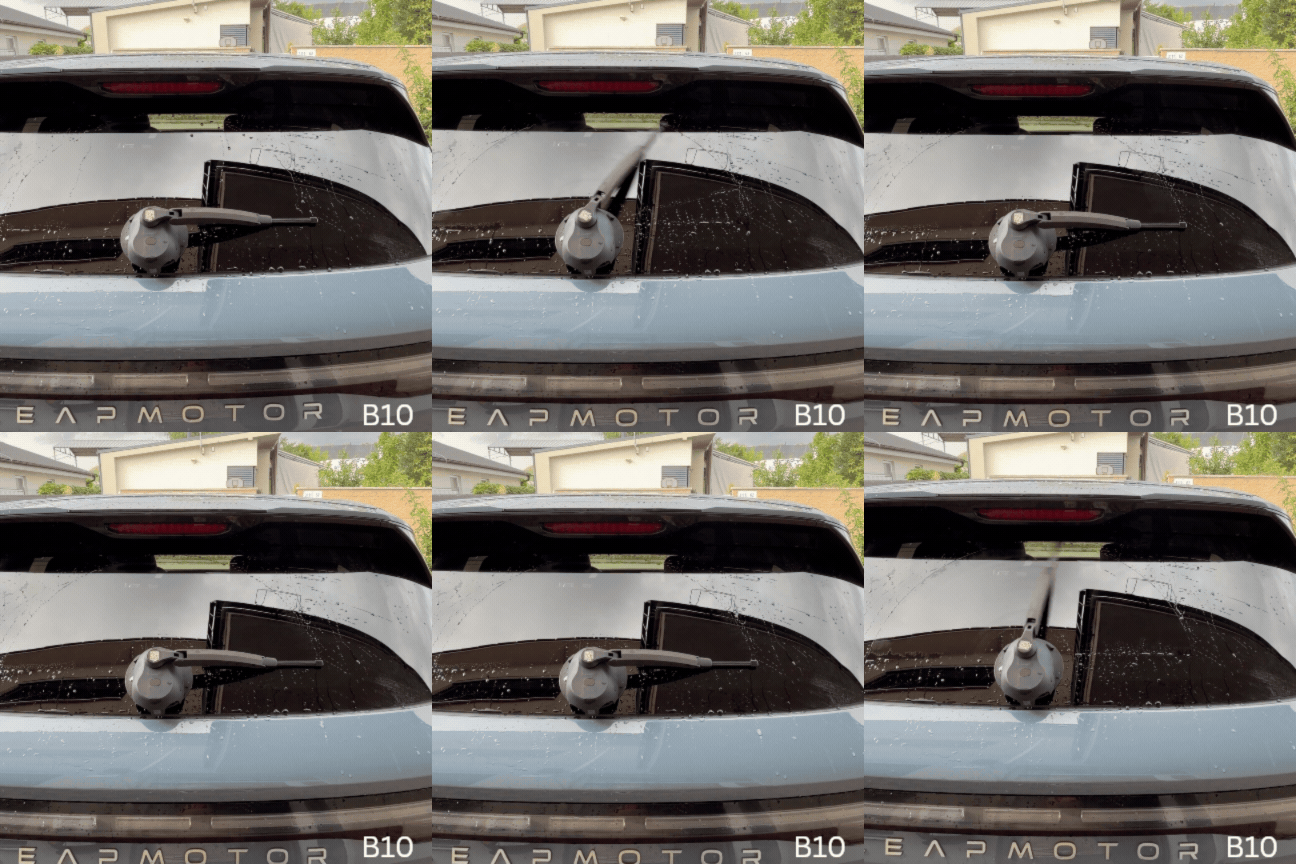
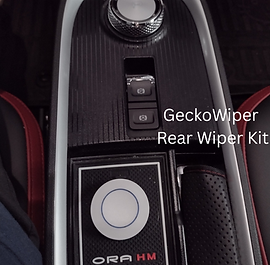
아래는 승인된 GeckoWiper 사용 사례 목록과 동영상입니다.











3. 패키지 구성품
GeckoWiper 후면 유리 와이퍼 유닛은 그림과 같이 구성되어 있습니다.
1.) 도마뱀붙이 사육장,
2.) 진공 펌프 플런저 표시기,
3.) 와이퍼 암,
4.) 와이퍼 블레이드
5.) 진공 패드,
6.) 원격 송신기
7.) 안전 자석
8.) 방수 커버 및 LED 충전 표시등이 있는 USB-C 충전 포트
9.) 본 최신 사용자 설명서는 QR 코드 링크로 제공됩니다.


그림 1: 게코와이퍼 주요 구성 요소, 1) 게코와이퍼 본체, 2) 진공 펌프 플런저 표시기, 3) 와이퍼 암, 4) 와이퍼 블레이드, 5) 진공 패드, 6) 리모컨, 7) 안전 자석, 8) 실리콘 방수 커버가 있는 USB-C 충전 포트
4. 설치 단계
GeckoWiper 설치는 현대 아이오닉 5를 예시로 보여드리는 것이며, 2장(호환성) 에 명시된 기타 모든 적용 차량/적합 차량에도 동일하게 적용됩니다.


3단계
창문을 깨끗이 닦고 물을 뿌려주세요.

뒷유리 청소하기:
진공청소기 패드를 놓을 부분의 오염 물질을 제거하기 위해 젖은 수건으로 뒷유리를 닦으십시오.
주목:
최적의 흡착력을 얻으려면 진공 패드를 부착하기 전에 유리창을 물에 적셔주세요.

창문을 적시다
청소 후, 게코와이퍼를 부착하기 전에 창문에 물을 가볍게 뿌려주세요.
이 단계는 진공력을 증가시키고 밀봉을 더욱 강화하는 데 중요합니다.
4단계
패드를 깨끗이 닦고 적셔주세요.

청소용 진공 패드
진공청소기 패드 표면을 물로 깨끗이 헹궈주세요.
진공청소기 패드를 적셔주세요
설치 시 진공 패드를 물에 적셔주세요. 건조한 상태보다 접착력이 훨씬 좋아집니다.
5단계
후면 와이퍼 설치

위치 주택
그림과 같이 와이퍼 시스템을 위치시키고 하우징을 창문에 단단히 밀착시키십시오. 진공 패드가 유리에 완전히 닿고 블레이드가 상단 스포일러에 걸리지 않는지 확인하십시오.
와이퍼의 펌프 실린더가 아래쪽을 향하고 블레이드가 위쪽을 향하도록 후면 와이퍼를 놓으십시오.
단단히 누른 다음 주황색 표시등이 사라질 때까지 펌핑하여 진공이 제대로 잡혔는지 확인하십시오.

진공 펌프
진공도가 부족하면 주황색 진공 펌프 플런저가 보이게 됩니다. 필요에 따라 점검하고 다시 고정하십시오.
6단계
충돌 점검

와이퍼를 수동으로 돌리세요
와이퍼 암을 수직 위치에서 ±90°까지 수동으로 회전시켜 와이퍼 블레이드와 차량 스포일러 사이에 충돌이 있는지 확인하십시오.

차량 차체 충돌 점검
스포일러와의 충돌 여부를 확인하기 위해 손으로 움직여 +-90도 범위 내에서 점검하십시오.
7단계
마운트 카운터 자석

자석 손잡이 위치 및 슬라이딩:
트렁크를 열고 자석 손잡이를 뒷유리 표면에 20cm 이상 떨어진 위치에 놓으십시오.
자석이 GeckoWiper® 장치의 중앙으로 끌어당겨질 때까지 천천히 밀어주세요.
주목:
GeckoWiper® 하우징 바로 뒤에 있는 자석을 축 방향으로 절대 이동시키지 마십시오.
창문에 충격을 줄 수 있는 강한 축 방향 당김을 피하려면 항상 일정 거리를 두고 하우징 쪽으로 접선 방향으로 밀어 넣으십시오.

이는 진공 및 자석 장착을 통해 이중 안전성을 보장합니다.
안전 자석은 차량 뒷유리 안쪽(뒷면)에 부착되어 있습니다.
8단계
마운트 리모컨 키

송신기 자기 고정
리모컨 키에는 내부에 자석이 내장되어 있어 현대 아이오닉 5의 스피커에 부착할 수 있습니다.
다른 차량(기아 EV6, 테슬라 Y 등) 및 용도의 경우, 단단한 플라스틱 표면에 원격으로 부착하기에 적합한 벨크로 후크 앤 루프 테이프가 제공됩니다.

고정용 벨크로 테이프
현대 아이오닉 5/6 이외의 차량의 경우, 리모컨 키는 벨크로를 사용하여 모든 단단한 플라스틱 표면에 고정할 수 있도록 설계되었습니다.
모범적인 기아 EV6 콕핏
9단계
닦는 동작 시작

닦기 시작하세요
닦기 기능을 시작하려면 리모컨의 버튼을 2초 이상 누르세요. 이 시간은 배터리의 절전 모드 설계 때문이며, 이는 대기 모드에서 와이퍼 내부 배터리 수명을 연장하는 데 도움이 됩니다.
두 번의 닦기 과정이 끝나면 동작이 멈추고 시스템은 다시 절전 모드로 들어갑니다.
1~3초 정도의 짧은 지연 후 재활성화가 가능합니다.

키 누름 2초 이상
리모컨 버튼을 누르고 빨간색 표시등이 켜진 상태에서 2초 이상 누르면 데이터 삭제 기능이 활성화됩니다.
5. 하차
게코와이퍼 탈착 방법은 현대 아이오닉 5를 예시로 보여드리는 것이며, 게코와이퍼가 장착된 다른 모든 차량에도 동일하게 적용됩니다.

3단계
내부 자석을 밀어서 분리하세요.
자석을 밀어서 떼어내세요.
트렁크가 열리면 내부에 있는 안전 자석을 하우징에서 수평 방향으로 밀어 빼내십시오.
주의: 자석의 자력이 매우 강하므로 축 방향으로 잡아당기지 마십시오. 자석은 항상 밀어서 제거하십시오.

슬라이드 전용
트렁크 내부의 안전 자석을 GeckoWiper 하우징에서 옆으로 밀어냅니다.
4단계
진공청소기 개방

진공청소기 개방
진공 패드의 고무 손잡이를 들어 올려 패드의 한쪽 면을 수직으로 들어 올려 진공 상태를 해제하십시오.
이제 GeckoWiper 장치를 창문에서 쉽게 분리할 수 있습니다.

진공청소기 패드 손잡이를 위로 당기세요.
고무 손잡이를 당겨 올리는 동작으로 작동하는 개방형 진공 시스템
5단계
조립 안전 자석

자석과 패드를 결합하세요
안전 자석은 매우 강력하므로 보관 시 진공 패드 안쪽 표면에 단단히 부착해야 합니다. 이렇게 하면 외부 자기장의 영향을 최소화하여 안전하게 보관할 수 있습니다.
주의: 자석을 흡착 패드에 놓을 때는 축 방향으로 움직이지 말고 굴리듯이 움직여야 자석이 끌어당기는 속도를 줄일 수 있습니다. 손가락이 끼이지 않도록 주의하십시오.

안전한 보관
안전한 보관을 위해 안전 자석을 진공 패드의 안쪽 면에 부착하십시오.
6. 안전 자석 취급 방법
게코와이퍼에는 강력한 네오디뮴 자석 두 개가 포함되어 있습니다. 이 자석은 차량 유리창에 안전하고 효과적으로 부착할 수 있도록 설계된 필수 부품입니다. 취급, 부착 및 탈착 시에는 아래의 안전 권장 사항을 참고하여 각별히 주의해야 합니다.

첫 번째 자석은 고무 재질의 진공 패드 뒤쪽에 부착되어 있습니다. 진공 패드 표면에 부착된 안전 라벨에도 이 내용이 표시되어 있습니다.

두 번째 자석은 역자석 손잡이의 고무 주름 아래에 위치합니다.
주목 !
부상 위험 - 강력한 자석


위험 관리:
GeckoWiper 자석은 매우 강력한 인력을 발생시켜 멀리 떨어져 있어도 예기치 않게 서로 달라붙을 수 있습니다.
취급 시 자성 부품(진공 패드 및 역자석) 사이에는 항상 최소 50cm의 거리를 유지하십시오.
핀치 해저드
자석 사이 또는 자석과 금속 표면 사이의 공간에 손가락, 피부 및 기타 신체 부위가 닿지 않도록 하십시오.
강한 자기력으로 인해 끼임 사고가 발생할 수 있습니다.
금속 물체나 표면 근처에서 자석을 만지지 마십시오.
일반적인 취급 시 주의사항
자석끼리 또는 금속 공구와 자유롭게 충돌하도록 두지 마십시오.
두 개의 GeckoWiper 자석 모두 고무로 덮여 있지만, 자석의 자력은 여전히 강해서 위험을 초래할 수 있습니다.
심장 박동기나 체내에 이식된 의료기기 근처에는 접근하지 마십시오. 자석이 기기의 기능에 방해를 줄 수 있습니다.
전자 기기, 신용 카드 및 데이터 저장 매체에서 안전거리를 유지하십시오. 자기장은 영구적인 손상을 초래할 수 있습니다.
장난감이 아닙니다
어린이에게 적합하지 않습니다.
게코와이퍼는 어린이와 반려동물의 손이 닿지 않는 곳에 보관하십시오.
7. 도로 안전
-
진공 펌프 플런저를 누르면 진공 패드에 안정적인 진공이 생성됩니다. 주황색 진공 레벨 표시등은 최대 진공에 도달하면 사라집니다. 사용 전에 주황색 진공 표시등이 보이지 않는지 확인하십시오. GeckoWiper®가 장착된 상태라면 주행 전에 표시등이 보이는지 다시 한번 확인하십시오. 진공 패드가 올바르게 부착되었다면 주황색 표시등은 12시간 동안 완전히 꺼진 상태로 유지되며, 이는 훨씬 더 오랜 기간(수개월) 동안 지속될 수 있는 안정적인 진공 상태를 나타냅니다.

와이퍼가 뒷유리에 단단히 고정된 경우에만 리모컨 키를 사용하여 와이퍼 작동을 시작하십시오. 리모컨 키를 손에 든 상태에서 와이퍼를 작동시키지 마십시오!
주의: GeckoWiper®는 진공 패드와 안전 자석이 모두 제대로 부착된 경우에만 작동하십시오. 안전 자석 없이 진공 패드만 사용하는 것은 금지되어 있습니다.
안전을 위해 주행을 시작하기 전에 리모컨 키를 사용하여 초기 테스트 닦기를 수행하여 GeckoWiper®가 제대로 작동하는지 확인하는 것이 좋습니다.
주황색 진공 플런저 표시기가 나타내는 것처럼 충분한 진공이 확보되지 않은 상태에서는 와이퍼를 작동하지 마십시오.
최적의 성능을 유지하려면 진공 청소기 패드를 깨끗하게 유지하십시오.
안전 자석은 항상 창문 뒤쪽에 부착해 두십시오.
제품을 사용할 때는 현지 교통 법규를 준수하십시오.
최상의 결과를 얻으려면 세차장에서 와이퍼 유닛을 분리한 후 다시 제대로 장착되었는지 확인하십시오.
8. USB-C 충전
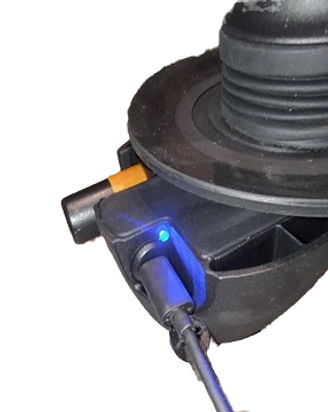
게코와이퍼는 휴대폰에 일반적으로 사용되는 USB-C 충전기와 호환되는 USB-C 충전 포트를 갖추고 있습니다. 정상적으로 충전될 경우, USB-C 충전기가 연결되면 파란색 LED 표시등이 켜지고 배터리가 완전히 충전되면(약 6시간 충전 후) 꺼집니다.
GeckoWiper® 시스템의 닦는 속도가 느려지거나 작동이 완전히 멈추는 경우, 충전이 필요할 수 있습니다. 내장된 방수 USB-C 충전 포트를 사용하여 기기를 충전하십시오.
-
완전 충전에는 약 6시간이 소요되며, 야간 충전을 권장합니다.
-
USB-C 충전 케이블을 차량용 내장 USB 충전기, 휴대폰 충전기 또는 보조 배터리와 같은 적절한 전원에 연결하십시오(표 3 참조).
-
보조 배터리(아래 이미지 참조)를 사용하면 GeckoWiper®가 뒷유리에 부착된 상태에서도 충전할 수 있습니다.
-
충전 중에는 파란색 LED 표시등이 계속 켜져 있다가 배터리가 완전히 충전되면 꺼집니다.

9. 유지보수
운전하기 전에 매번 확인하세요.
진공 표시기:
펌프의 주황색 진공 표시등이 보이지 않아야 하며, 이는 진공이 사용 가능함을 나타냅니다.
주황색 표시등이 켜지면 진공도가 낮아진 것이므로 펌핑을 다시 하거나 재청소를 해야 합니다.
창문 청소:
새 부품을 부착하기 전에 뒷유리에 물을 뿌려 깨끗하게 닦아주세요 .
진공 패드 청소 및 점검:
진공 패드를 설치하기 전에 깨끗하고 손상되지 않았는지 확인하십시오.
자석 설치:
창문 뒤쪽에 있는 자석이 올바르게 설치되었는지, 그리고 육안으로 잘 보이는지 확인하십시오.
자석 취급:
자석을 제거하거나 부착할 때는 항상 수평 방향으로 밀어서 움직이십시오.
뒷유리에 감전이 발생할 수 있으므로 자석을 GeckoWiper® 하우징 쪽으로 또는 하우징에서 멀어지는 방향으로 축 방향으로 움직 이지 마십시오 .
10. 빠른 도움 및 해결책
다음과 같은 간편한 해결 방법을 참고하시면 신속하게 문제를 해결하실 수 있습니다. 궁금한 점이 있으시면 언제든지 문의 양식을 통해 직접 연락 주세요. 항상 기꺼이 도와드리겠습니다.
🔧 ID 1 - 활성화
상황
리모컨 키를 눌러도 와이퍼가 작동하지 않습니다.
이유
키 누름 시간 <2초
GeckoWiper 배터리 방전
리모컨 키 배터리 방전
해결책
와이퍼를 작동시키려면 버튼을 2초 이상 길게 누르십시오. 시스템은 에너지 절약을 위해 절전 모드로 전환되며, 다시 작동시키려면 2초 이상 버튼을 눌러야 합니다.
USB-C 포트를 통해 배터리를 충전하세요.
리모컨 키에 들어가는 CR2016 코인 배터리 2개를 교체하세요(일반적으로 2년 후 교체). CR2016 배터리 윗면에 자석이 붙어 있도록 하세요.
🔧 ID 2 - 진공 패드
상황
진공 패드의 미세한 누출
이유
진공 패드의 건식 장착면
진공 패드 밀봉면 손상
펌프에 이물질이 들어갔습니다.
창 표면이 더럽거나 고르지 않음
해결책
물기가 있는 수건으로 창문과 패드를 닦아 먼지를 제거하십시오. 최적의 흡착력을 위해 미리 물에 적신 뒷유리에 패드를 다시 부착하십시오.
진공 패드 교체 관련 문의는 저희에게 연락주세요.
펌프 플런저 청소
젖은 수건으로 창문과 패드를 닦거나 물로 헹궈 이물질을 제거하십시오. 흡착력을 높이려면 젖은 뒷유리에 패드를 다시 부착하십시오.
🔧 ID 3 - 진공 패드
상황
진공이 빠르게 누출됨
이유
손상된 진공 패드 표면
손상된 펌프
창 표면이 더럽거나 고르지 않음
해결책
진공 패드 교체 관련 문의는 저희에게 연락주세요.
펌프 교체 관련 문의는 저희에게 연락주세요.
젖은 수건으로 창문과 패드를 닦거나 물로 헹궈 이물질을 제거하십시오. 흡착력을 높이려면 젖은 뒷유리에 패드를 다시 부착하십시오.
🔧 ID 4 - 진공 펌프
상황
펌프가 고장났습니다
이유
진공청소기 아직 판매 중입니다.
펌프에 이물질이 들어갔습니다.
해결책
10시와 2시 방향에 있는 두 개의 패드 돌출부를 눌러 진공을 해제하십시오. 이렇게 하면 공기가 유입되어 플런저가 바깥쪽으로 움직입니다.
펌프 내부 부품 청소
🔧 ID 5 - 와이퍼 시작 위치
상황
와이퍼가 의도된 시작 위치에 있지 않음
이유
와이퍼가 의도된 시작 위치에 있지 않음
해결책
리모컨 버튼을 2초 이상 누르면 와이퍼 암이 자동으로 재정렬됩니다.


🔧 ID 7 - 와이퍼 암 스프링 재장착
상황
와이퍼 블레이드의 창문에 가해지는 압력이 부족함
이유
와이퍼 암 스프링 분리됨
해결책
차량에서 GeckoWiper를 분리하세요
아래 1단계와 2단계를 따르세요.


1.) 와이퍼 암 스프링 탈거 ( 영상 링크 )
2.) 와이퍼 암 스프링 재장착 ( 영상 링크 )
11. 기술 사양
GeckoWiper®는 탈부착 가능한 후면 유리 와이퍼입니다.
리모컨 키 작동 시간 >10m
배터리 구동식
이중 진공 및 자석 고정
10초 만에 빠르게 장착 가능
특허 출원 중인 디자인
대기 기간: 6개월 이상
컴팩트한 디자인
저에너지 설계
공구 없이 설치 및 분리 가능
닦는 각도 +-90도
USB-C 충전이 가능하며, 창문에 장착한 상태에서도 충전이 가능합니다.
진공 표시기: 주황색 펌프 진공 표시기
무게: 1kg
전 세계 적격 차량 사용
12. 반품 및 보증
13. 일반 약관
링크를 참조하세요